
Recently, I have been exploring how to encrypt my DNS traffic on Fedora 42 using DNS over TLS (DoT). Along the way, I ran into confusing symlinks, missing config files, and a few misconceptions about how Fedora handles DNS under the hood. Here’s everything I learned, condensed into a practical guide for anyone else trying to harden their DNS on Linux.
TL;DR
- Fedora uses
systemd-resolvedfor DNS. /etc/resolv.confis usually a symlink to a stub file—don’t edit it directly.- Use a drop-in config in
/etc/systemd/resolved.conf.d/to enable DNS over TLS. - DNS over HTTPS (DoH) is not supported by
systemd-resolved. - Cloudflare and Quad9 are good DNS providers with DoT support.
What I Did
1. Discovered /etc/resolv.conf is a symlink
ls -l /etc/resolv.confExpected output:
/etc/resolv.conf -> ../run/systemd/resolve/stub-resolv.confThis confirms systemd-resolved is managing DNS. Editing this file is useless—it’s managed dynamically:
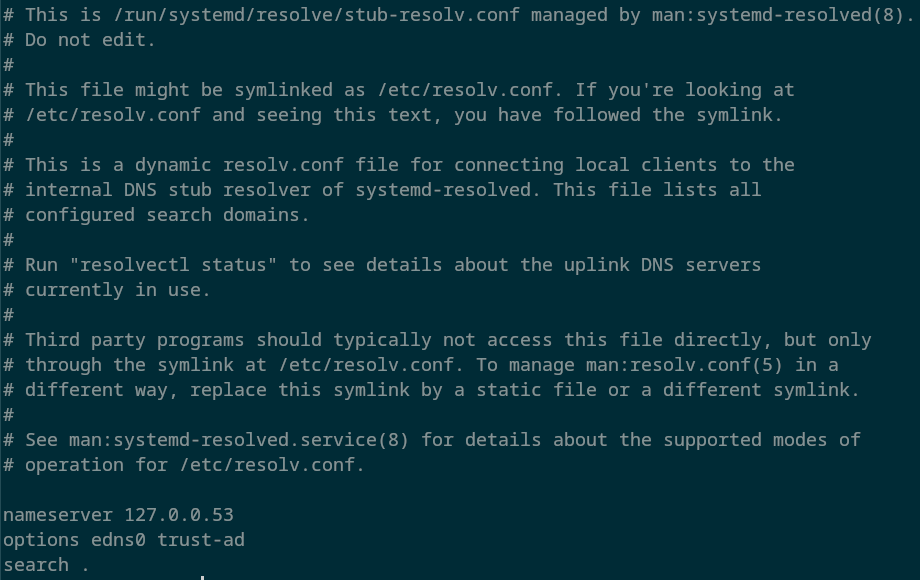
2. Created a config directory for custom settings
sudo mkdir -p /etc/systemd/resolved.conf.dThen created a new config file:
sudo nano /etc/systemd/resolved.conf.d/dns-over-tls.conf3. Configured DNS Over TLS
In that file, I added:
[Resolve]
DNS=1.1.1.1#cloudflare-dns.com 9.9.9.9#dns.quad9.net
DNSOverTLS=yes
Here’s what this does:
- Sets two DoT-enabled resolvers (Cloudflare and Quad9).
- Enforces encrypted DNS transport via TLS.
4. Restarted systemd-resolved
sudo systemctl restart systemd-resolved5. Verified DoT was working
resolvectl statusLook for:
DNS Over TLS: yes🎉 Done!
Why DNS over TLS (and not HTTPS)?
While both DNS over TLS (DoT) and DNS over HTTPS (DoH) encrypt DNS traffic to prevent snooping and tampering, there are key differences:
| Protocol | Port | Protocol | Common Clients |
|---|---|---|---|
| DoT | 853 | TLS | systemd-resolved, stubby |
| DoH | 443 | HTTPS | Browsers, cloudflared, dnscrypt-proxy |
We chose DNS over TLS for this setup because:
- Fedora 42 with systemd-resolved only supports DoT natively.
- DoT is simpler to configure at the system level (no extra proxies).
- DoT separates DNS from other HTTPS traffic, making it easier to monitor/debug.
If you need DoH, you’ll have to install and run an external proxy like cloudflared or dnscrypt-proxy, which adds complexity. Since our goal was a clean, system-integrated solution using what’s already available on Fedora 42, DoT was the right fit.
What I Learned
systemd-resolvedis more powerful than I thought, but poorly documented in some areas.- The real DNS config lives in
/etc/systemd/resolved.conforresolved.conf.d/drop-ins. - The
/etc/resolv.conffile is a stub and shouldn’t be edited—it’s managed dynamically. - DNS over TLS is natively supported. DNS over HTTPS is not (use
cloudflaredordnscrypt-proxyfor that).
References
- systemd-resolved Arch Wiki
- Fedora System Administrator’s Guide – Networking
- Cloudflare DNS-over-TLS docs
- Quad9 DNS security
Optional Next Steps
- Use
cloudflaredordnscrypt-proxyif you want DNS-over-HTTPS. - Add monitoring with tools like Wireshark to verify encrypted DNS traffic.
- Use DNS Leak Test to ensure nothing leaks to your ISP.
This was a quick little project that I embarked on, if you read this I hope this helped and that it saves you time!